Installing PHPMyAdmin on Windows XP Pro 6
What do we have in this session 6?
-
Configuration for PHP v5
-
More Advanced Settings
|
|
Configuration for PHP v5
Note that this step is only required for PHP v5. Under PHP v4, PHP extension php_mysql.dll is build in and extension php_mysqli is not supported. Edit file php.ini, under the [Dynamic Extensions] Section by un-commenting the following lines (if not done yet).
The following is the shortcut.
|
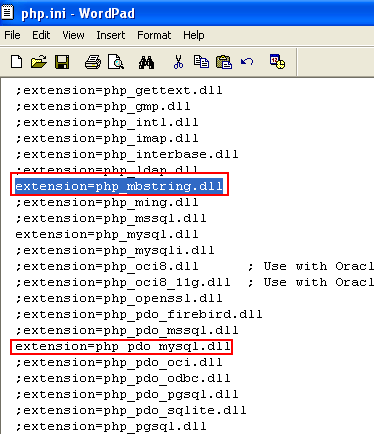
You need to make sure the DLL is available under the ./ext folder. If those DLLs not available, you need to download them.

Next, clear the Browser’s cookies and reload the http://localhost/myphpadmin/ (or the URL that you have chosen during the setup).
-----------------------------------------------------------------

More Advanced Settings
Well, the access works. However this is not what we want. The sample config.inc.php given is very basic that provide limited use. Let use the default given config.inc.php. Find the config.default.php file under C:\Inetpub\wwwroot\phpmyadmin\libraries folder. Firstly you need to rename the original config.inc.php file to other name.

Then, copy config.default.php file to %your_phpmyadmin_root%\phpmyadmin folder. Rename the config.default.php to config.inc.php. Open the file in WordPad.
Fill in the following line of script.
$cfg['blowfish_secret'] = 'dddhg6867877hgghg8908989';
With alphanumeric characters as done previously and save the file. Then, reload the phpmyadmin URL.


Fill-in MySQL root username and its password (as used in MySQL installation). We cannot use pma user because all the configuration are set to defaults. However, by referring the documentation, the defaults value should be fine. (If the parameters are not provided, then the values will be set to defaults);

Well, if it takes so long to login and then the page just blank re-open config.inc.php file and change the host parameter from 'localhost' to '127.0.0.1', save the file.

Make sure you clean-up the Browser’s cookies and reload the URL.
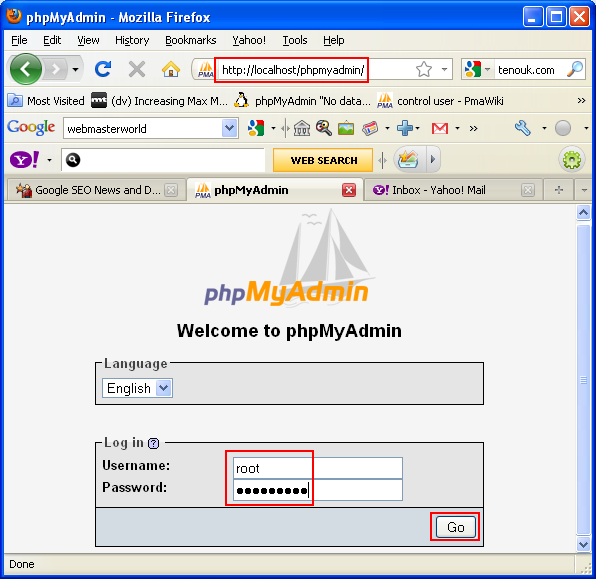

Now, all the system go!

< PHPMyAdmin 5 | Java and Opensource Friends | PHPMyAdmin 7 >